
AI CHARACTERS · HOW-TO GUIDE
The face in shot four is almost her. The jaw is a little softer, the eyes a little wider, and nobody watching could say what changed. By shot nine she is somebody else. This is the problem that makes people give up on AI characters. Rerolling does not solve it, because every reroll is a new face rather than a repaired one. AI character face consistency is a diagnosis problem before it is a prompt problem. Faces drift in six recognisable ways, each with its own cause. Name the drift, fix the cause, correct the frame, and the face comes back. This guide gives you the six types and the audit prompt that names them. It also gives you the correction prompt that repairs the shot, and the reference rules that stop the drift returning.
At a glance
- Learn the six ways a face drifts and what causes each one.
- Audit the drifted frame against the turnaround so the change is named, not felt.
- Correct the frame instead of rerolling it.
- Add an identity anchor line to every scene prompt.
- Clean up the references that caused the drift.
- Retrain or rebuild the identity only when the audit says the identity itself is thin.
You will need: an approved identity turnaround or a trained Soul ID, a model that can compare two images (Claude or ChatGPT), and the drifted frames you want to fix.
The Six Ways a Face Drifts
Every drifted face I have ever corrected falls into one of six types. Knowing which one you have tells you the cause, and the cause tells you the fix.
Feature drift. One feature changes: the nose narrows, the lips fill, the eyebrows lift. The rest is right. Cause: the identity description is vague on that feature, or the prompt mentions it in different words each time.
Age drift. The same face, five years younger or older. Cause: a mood or lighting word is pulling the model towards an age, such as glowing, weathered, fresh or tired.
Expression lock. The face is right but it wears the same expression in every shot, or the expression you asked for has rewritten the features. Cause: an expression sheet with too few frames, or an expression word that is too strong.
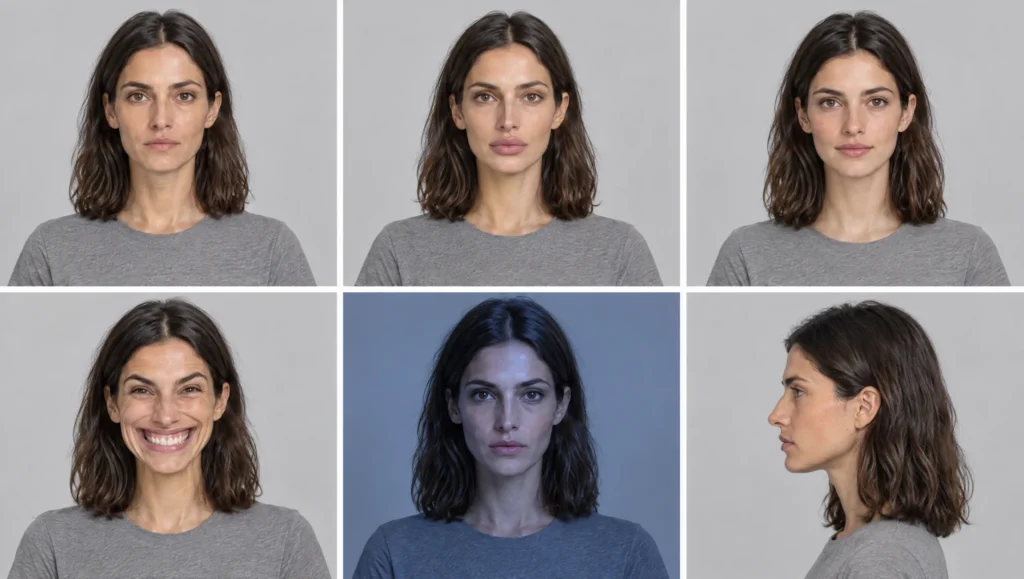
Lighting drift. The face looks different under coloured or hard light, usually darker skin or a narrower face in cool light. Cause: no frames in that lighting condition in the identity set, so the model invents them.
Angle collapse. The face holds straight on and falls apart in profile, from above or in a wide shot where it is small. Cause: thin coverage of those angles in the turnaround, and no identity anchor in the prompt when the face is small.
Blend. Two characters in one scene borrow features from each other, or your character borrows from a reference image that is not her. Cause: a reference image with another face in it, or two similar characters in one generation.
Most of these are reference contamination. The model did what it was shown, and it was shown the wrong thing.
Step 1: Audit the Frame So the Drift Has a Name
Do not fix a face by eye. Put the drifted frame next to the identity turnaround and have a model that can see images list the differences. The list is the diagnosis.
Prompt 1: Face Drift Audit (attach the turnaround as image one and the drifted frame as image two)
Compare the face in image two with the face in image one. Go feature by feature: face shape, skin tone, eyes, eyebrows, nose, lips, distinguishing marks, hairline and hair, apparent age. For each, say "same" or describe the difference in one line. Then name the drift type from this list: feature drift, age drift, expression lock, lighting drift, angle collapse, blend. Rate the identity match from 1 to 10. Ignore clothing, composition and background.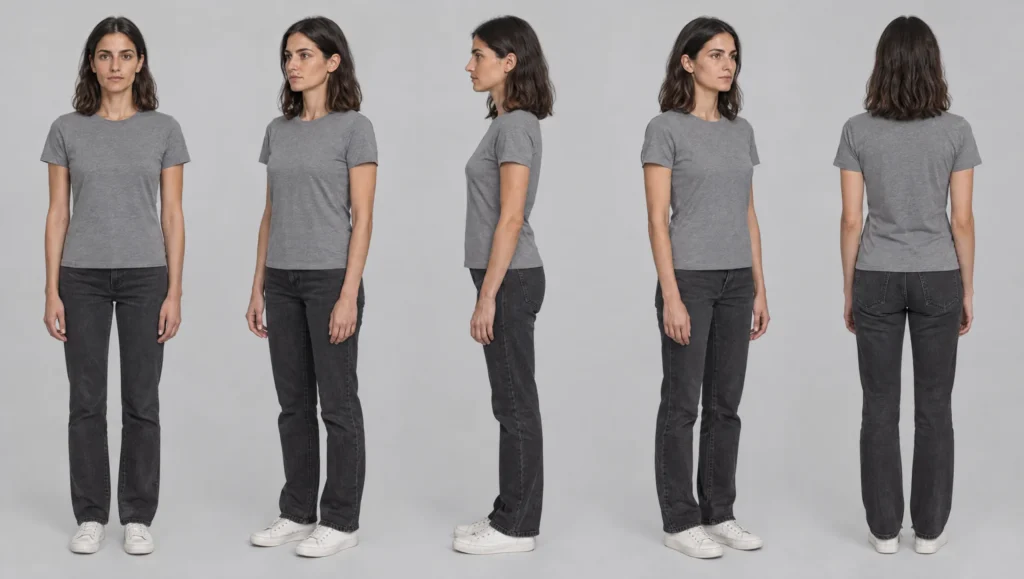
Keep the audit. The feature lines go straight into the correction prompt in Step 2, and the drift type tells you which cleanup to do in Step 4.
Step 2: Correct the Frame Instead of Rerolling
A reroll throws away the composition, the light, the pose and the moment. It also gives drift another chance. A correction keeps all of that and changes the face back. In Higgsfield, select the Soul ID, attach the drifted frame and the turnaround, and use the audit lines.
Prompt 2: Face Correction (Character tab: your Soul ID · image references: the drifted frame as image one, the turnaround as image two)
Keep image one exactly as it is: same composition, same pose, same clothing, same lighting, same background. Change only the face and hair so they match the person in image two: [PASTE THE DIFFERENCE LINES FROM THE AUDIT]. Apparent age as in image two. Change nothing else.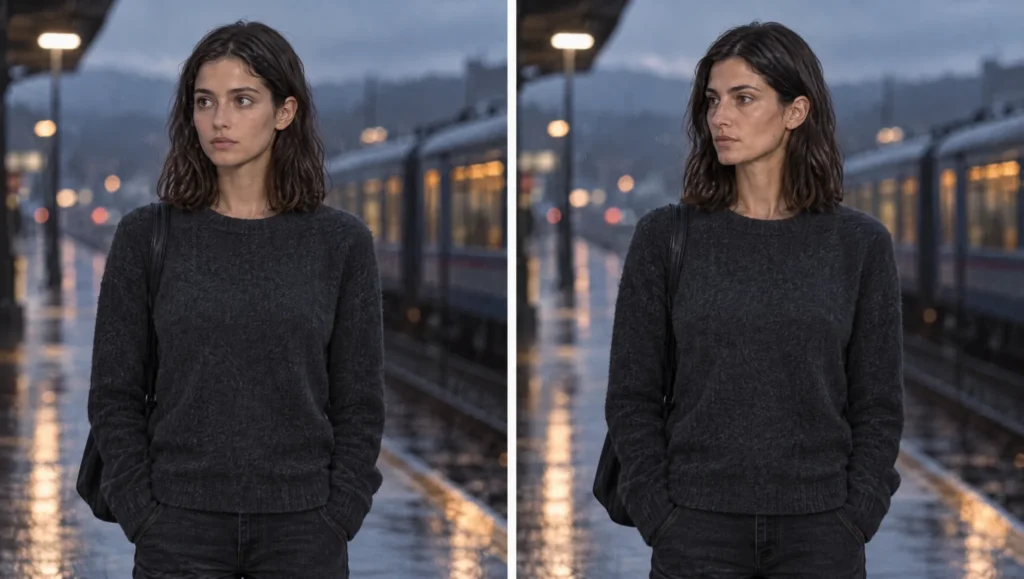
Run the audit again on the corrected frame. If it scores 8 or more, keep it. If a feature is still wrong, correct once more with only that feature named. Two corrections is the limit; if the face is still wrong after two, the cause is in the references, and you go to Step 4.
Step 3: Put an Identity Anchor in Every Scene Prompt
Once the identity lives in a Soul ID, you stop describing the face in prompts. The exception is a single short anchor line that reminds the model where the face comes from. It matters most where the face is small or in profile.
Prompt 3: Identity Anchor Line (add to the end of any scene prompt)
The face, hairline, hair and apparent age match the trained character exactly, at every size and angle. No change to the features.For a wide shot where the face is small, add one more sentence so the face is not left to chance.
Prompt 4: Small-Face Anchor (add to wide shots)
Even at this distance the face is clearly the trained character: same face shape, same hair length and colour, same posture. Render the face sharply.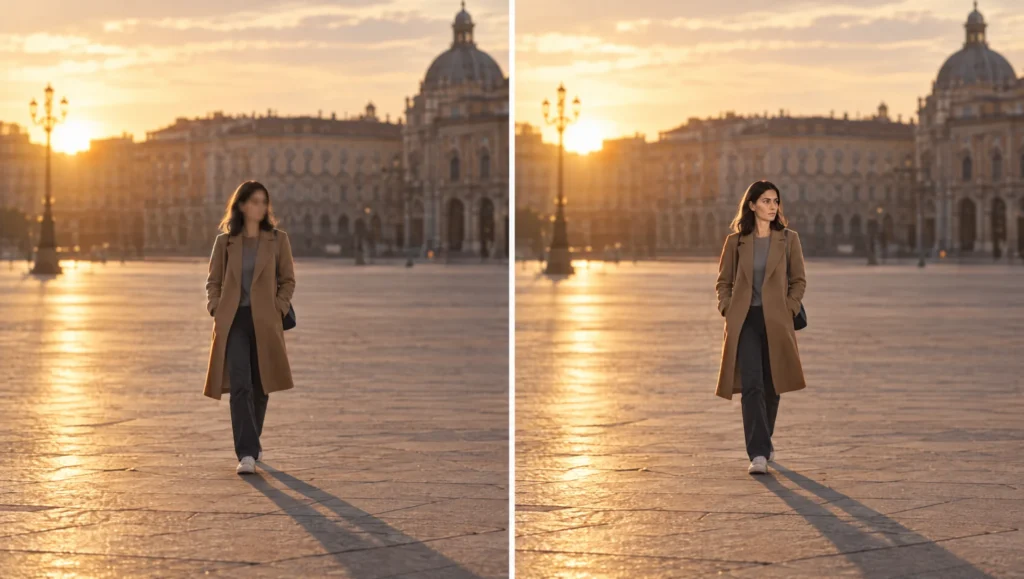
Do not go further than this. A paragraph describing the face on top of a trained Soul ID gives the model two opinions, and the second opinion is where drift gets in.
Step 4: Clean Up the References That Caused It
The audit named the drift type. This is the cleanup for each.
For feature drift, open the identity description and make the vague feature exact. “Straight nose” becomes “straight, narrow nose with a slightly rounded tip”. Regenerate the turnaround with the sharper line and approve it.
For age drift, find the age word in your scene prompts. Glowing, fresh, youthful, weathered, tired and worn all move the age. Replace them with a lighting or acting instruction that says what you meant.
For expression lock, generate a second expression sheet with four new expressions and the strength you want, then crop it into the identity set and retrain. If you are not using Soul ID, attach the expression sheet alongside the turnaround for scenes with strong emotion.
For lighting drift, generate a four-lights sheet in the exact light the scene uses, add it to the identity set and retrain. The model stops inventing the face in that light because it has now seen it.
For angle collapse, add a second close-up sheet with the missing angles, including a true profile and a high angle, and retrain. Use the small-face anchor on every wide shot.
For blend, remove every reference image that contains another face. For two-character scenes, train each character separately and bring them together with Elements. Design the two characters to be different in silhouette, hair and main colour.
Prompt 5: Identity Gap Sheet (Character tab: your Soul ID or image reference: the turnaround)
Four head-and-shoulders portraits of [CHARACTER NAME] in a two-by-two grid, plain mid-grey crew-neck T-shirt, plain light grey background. Frames: [THE MISSING ANGLES OR LIGHTING CONDITIONS FROM THE AUDIT, ONE PER FRAME]. Neutral expression. Same face, same hair, same distinguishing marks, same apparent age in every frame. Photographic realism. No text.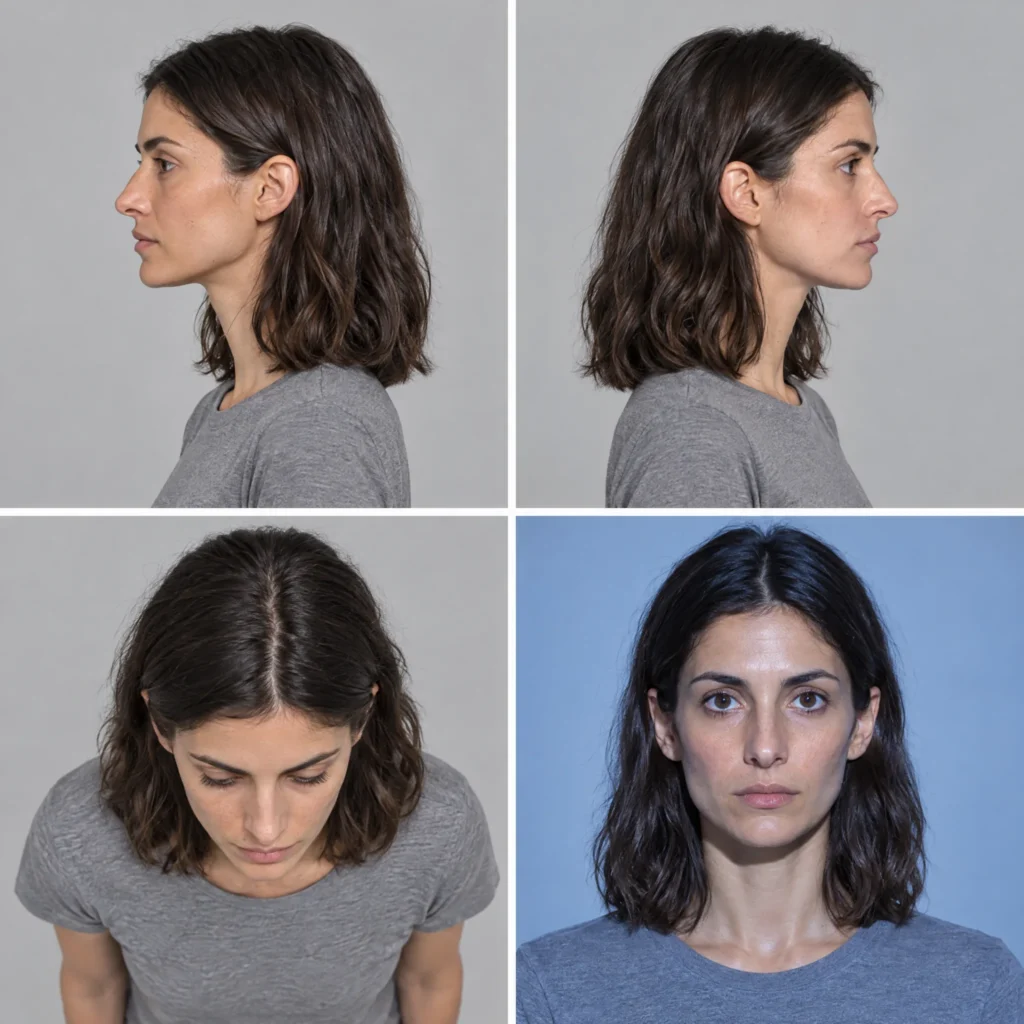
Crop the frames, add them to the identity folder, and train the next version of the Soul ID. Name it with the version number so you know which gap it closed.
Step 5: Decide Whether to Correct, Retrain or Rebuild
Three outcomes, in order of cost.
Correct when the audit scores 6 or more and names one or two features. The identity is fine; the frame slipped.
Retrain when the same drift type appears in three or more frames. The identity set has a gap. Generate the gap sheet, crop it, retrain, and the problem stops at the source.
Rebuild when the audit scores under 5 on frames generated straight from the turnaround with nothing else attached. The turnaround itself is weak, usually because the description was vague or the five views were not the same person. Rewrite the description, regenerate the turnaround, and build the identity set again. It costs an hour and saves a week.
Keeping the Face From Drifting Again
Three habits keep a face stable across a whole project. Reference only the identity sheets and the current outfit sheet. Never attach a scene frame with a different face or outfit in it. Carry forward the strongest approved frame as the reference for the next shot in the same scene. The sequence then builds on an approved face rather than on a fresh roll. And run the audit on the first frame of every new scene, before you build the scene on top of it.
When the face holds and the clothes are the next thing to change, the outfit method in my guide to changing an AI character’s outfit picks up from here.
Common mistake
Rerolling until it looks right. Ten rerolls give you ten faces and no reason to trust the eleventh. The one that looks right is a lucky roll, and the next scene will not be lucky. Audit, correct, and if the drift repeats, fix the identity set. The face stops changing when the cause is gone, not when the roll is good.
Quick version
Name the drift: feature, age, expression, lighting, angle or blend. Audit the frame against the turnaround so the differences are listed. Correct the frame with the audit lines, keeping everything but the face. Add a one-line identity anchor to every scene prompt and a small-face anchor to wide shots. Clean the references that caused the drift, and retrain with a gap sheet when the same drift repeats.
Your move
Take the worst drifted frame from your current project and run Prompt 1 against the turnaround now. Read the drift type, then run Prompt 2 once. Compare the result with the reroll you would have done instead.
Get the prompts. All five prompts from this guide are in the free Prompt Library under Correction, with the identity and continuity sets alongside them.
Related articles
- how to create a consistent AI character from scratch
- how to build an AI character sheet in Higgsfield
- how to keep an AI character’s wardrobe consistent across scenes
- how to change an AI character’s outfit without losing the character
Paid next step: The AI Character Continuity System, the complete method with 72 prompts, the full character sheet, the correction library and a worked example.
Frequently Asked Questions
Why does my AI character’s face change in every shot?
The model is being shown or told something different each time. The usual culprits are a vague description, a reference frame with a different face or outfit, or a mood word that moves the age. Find which of the six drift types you have and fix that cause.
Should I reroll or correct a drifted face?
Correct. A correction keeps the composition, pose and light and changes only the face back. A reroll is a new face with the same odds of drifting.
Does Soul ID stop face drift completely?
No. Soul ID aims for clearly the same person, and it holds well when the training set covers the angles, expressions and lighting your scenes use. Gaps in the set show up as drift, and a gap sheet closes them.
How do I fix a face that is too small in a wide shot?
Add the small-face anchor line to the prompt and attach the turnaround as a reference. If it still fails, generate the wide shot and then correct the face with Prompt 2.





Read the Comments +