HIGGSFIELD · TOOL GUIDE
Higgsfield’s Soul ID is the best tool I know for keeping a character’s face the same from shot to shot. It has one catch. It wants twenty or more photographs of a real person, taken from different angles, in different expressions, in good light. If your character is fictional, you have none of those. This guide shows you how to make them. You build a character sheet in Higgsfield first, approve it, cut it into a training set, and only then train the Soul ID. Done in this order, a character who existed only in your notes an hour ago becomes a trained identity you can place in any scene.
At a glance
- Write the character in words before you generate anything.
- Generate one identity turnaround and approve it.
- Generate an expression sheet and a lighting sheet from the turnaround.
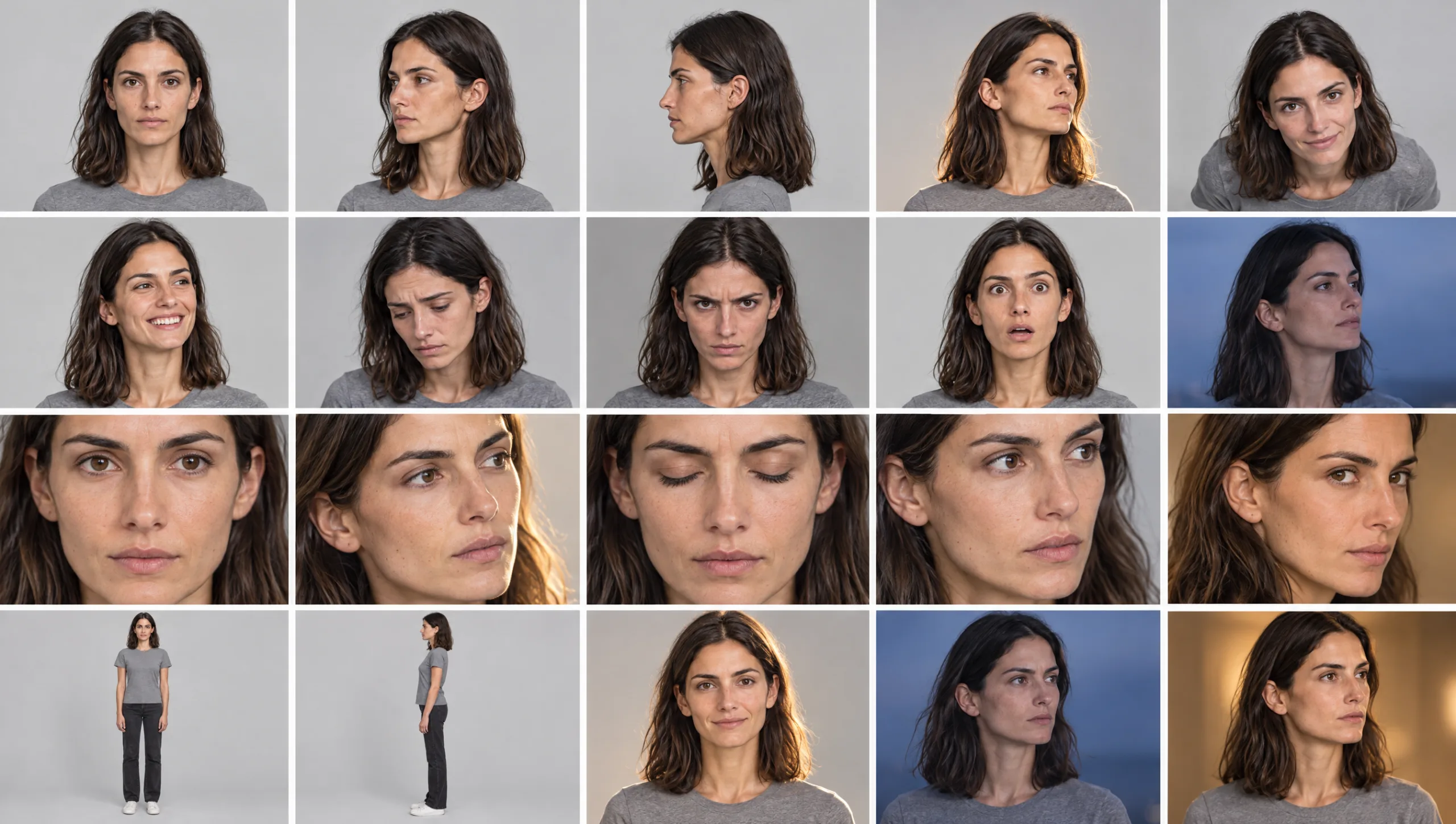
- Crop the sheets into twenty or more single images.
- Train the Soul ID on those images and name it.
- Test it in three scenes before you commit to a project.
You will need: a Higgsfield account with Soul access, Claude or ChatGPT for the writing steps, and any image editor that can crop, such as Preview, Photos or Canva.
What Soul ID Needs From You
Soul ID trains a persistent identity from photographs. According to Higgsfield’s own help centre, it wants twenty or more photos of the same person, with up to eighty supported. The photos should show the face from different angles and with different expressions. The photos should be well lit, with no sunglasses, no heavy shadows and no cropped faces. At least one should show the full height of the person. Training takes a few minutes and you give the character a name. From then on you select it in the Character tab whenever you generate.
Two limits shape everything that follows. A Soul ID holds one person, so a scene with two consistent characters needs two Soul IDs and Higgsfield’s Elements feature to combine them. And Soul ID aims for “clearly the same person” rather than a pixel-identical copy, which is exactly why the character sheet underneath it has to be strong.
The whole method, then, is to manufacture the twenty photos that Soul ID is asking for, from a character you control completely.
Step 1: Write the Character Before You Generate
Every drift problem starts with a vague description. Before you open Higgsfield, write the character down in enough detail that two different people could draw the same face from your words.
You need the face shape, the skin tone and texture, the eyes, the eyebrows, the nose and the lips. Add any distinguishing marks with their exact position, and the make-up baseline. Then comes the hair: its colour as an exact shade, its length against a body landmark, its texture, the parting side and which ear it is tucked behind. Finish with height, build and posture.
Prompt 1: Character Description Builder (run in Claude or ChatGPT)
You are a casting director and portrait photographer. Write a precise physical description of a fictional character for an AI image model, in this order: face shape, skin tone and texture, eyes (colour, shape, spacing), eyebrows, nose, lips, distinguishing marks with exact position, make-up baseline, hair colour as an exact shade, hair length against a body landmark, hair texture, parting side and tucked ear, height, build, posture. Use the vocabulary a photographer would use. No clothing, no setting, no mood. Keep it under 120 words.

Character idea: [ONE OR TWO SENTENCES]
Age range: [AGE RANGE]
Save the result. It is the paragraph you will paste into every identity prompt, unchanged. In my own work this description lives in Section 2 of the character sheet, and the rest of this guide assumes you have it.
Step 2: Generate the Identity Turnaround
Open Soul in Higgsfield and generate from text. The first image is the most important one you will make, because every other image is built from it. Generate it in a plain grey T-shirt so that no clothing information gets into the identity. Use a plain background so that no location does either.
Prompt 2: Identity Turnaround
Character turnaround sheet of [CHARACTER NAME]. [PASTE THE DESCRIPTION FROM PROMPT 1]. Wearing a plain mid-grey crew-neck T-shirt and plain dark trousers. Five full-length views in a row on a plain light grey background: front, three-quarter left, left profile, three-quarter right, back. Neutral expression, arms relaxed. Even soft studio lighting, true-to-life skin texture, photographic realism, identical proportions in every view. No text, no labels.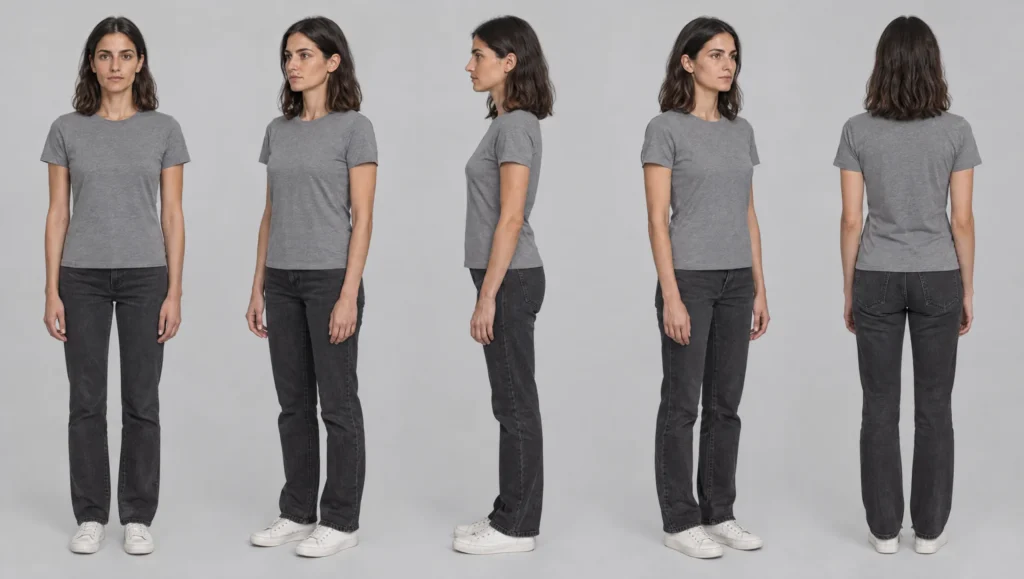
Generate at the highest resolution available and at a wide aspect ratio such as 16:9 so each of the five views has enough pixels to crop later.
Look at the result as a casting director, not a fan. Is this the person you wrote? Are the five views the same person? If anything is wrong, change the words in the description rather than hoping the next roll fixes it, and generate again. Do not move on until you would recognise this face in a crowd.
Step 3: Build the Expression and Lighting Sheets
Soul ID wants varied angles and expressions. A turnaround gives you angles. Two more sheets give you expressions and light, and both are generated with the approved turnaround attached as the image reference.
Prompt 3: Expression Sheet (attach the turnaround)
Using the person in the reference image, create an expression sheet. Head and shoulders, plain mid-grey crew-neck T-shirt, plain light grey background, even soft studio lighting. Six expressions in a two-by-three grid: resting, quiet joy, sadness, tension, surprise, determination. Same face, same hair, same distinguishing marks, same proportions in every frame. Expressions subtle and cinematic, not exaggerated. Photographic realism. No text, no labels.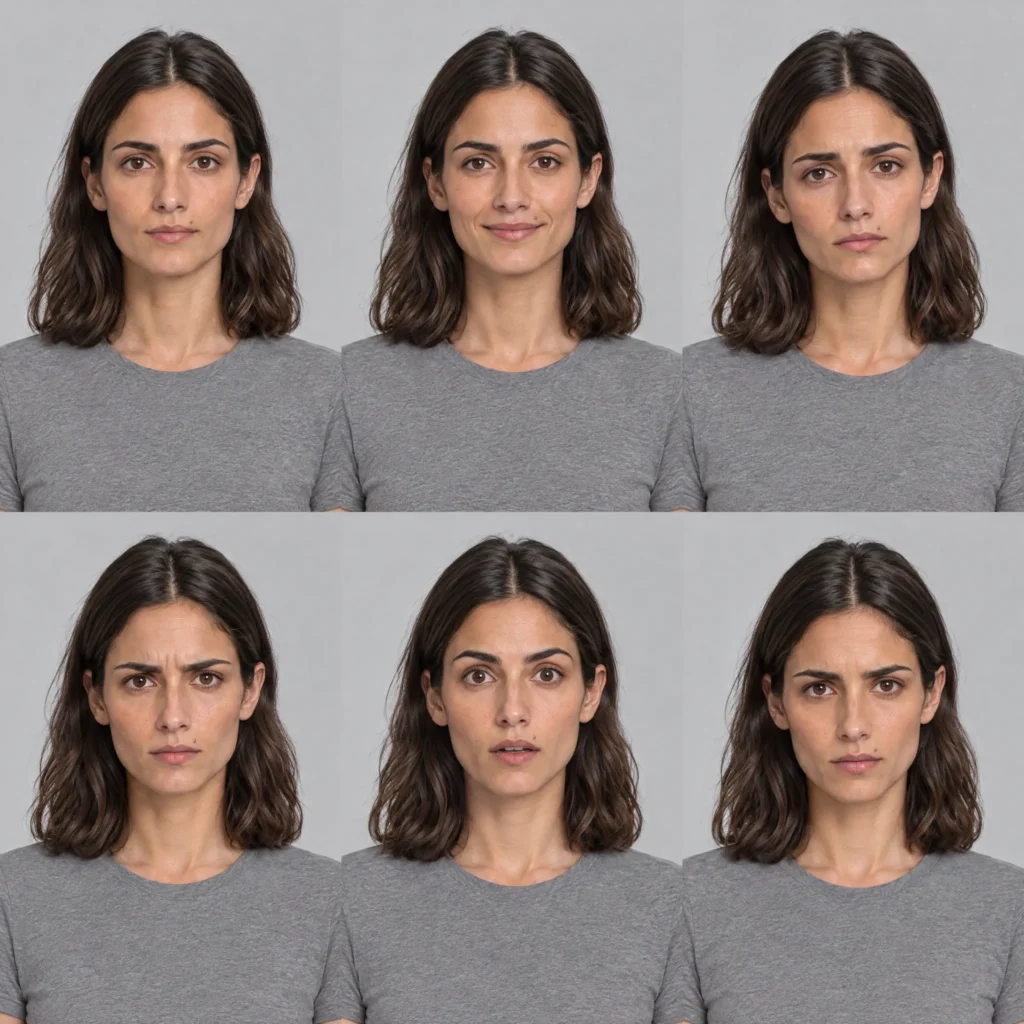
Prompt 4: Four-Lights Sheet (attach the turnaround)
Four head-and-shoulders portraits of the person in the reference image in a two-by-two grid, same neutral expression, slightly different angle in each. Top left: soft daylight. Top right: warm golden hour side light. Bottom left: cool blue dusk. Bottom right: low warm tungsten interior light. The face, skin tone, hair colour and all features are identical in every frame; only the light changes. Plain mid-grey crew-neck T-shirt. Photographic realism. No text.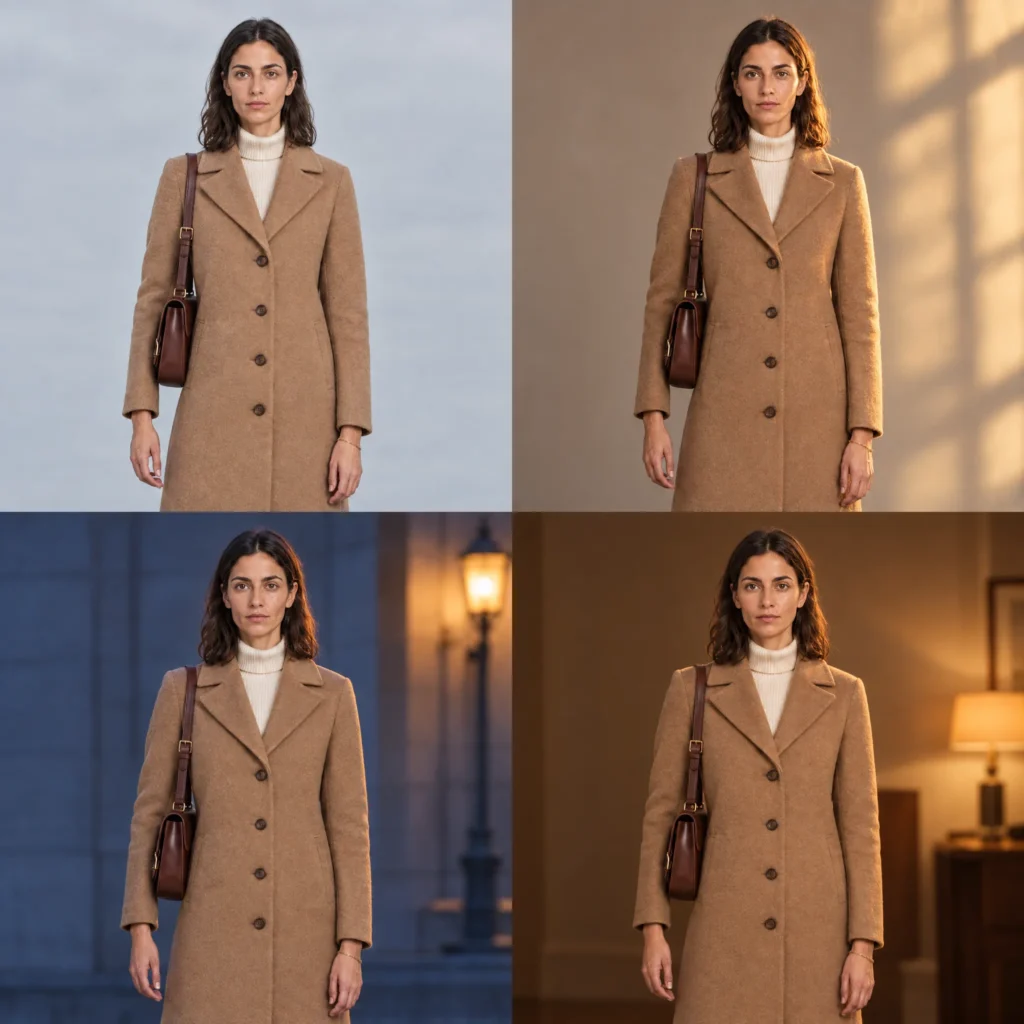
Prompt 5: Close-Up Sheet (attach the turnaround)
Four tight head-and-shoulders portraits of the person in the reference image in a two-by-two grid, 85mm lens, plain light grey background, soft even studio lighting. Angles: straight on, three-quarter left, three-quarter right, slightly from above. Neutral expression. Every detail of the face sharp and accurate, true-to-life skin texture, no retouching, photographic realism. No text.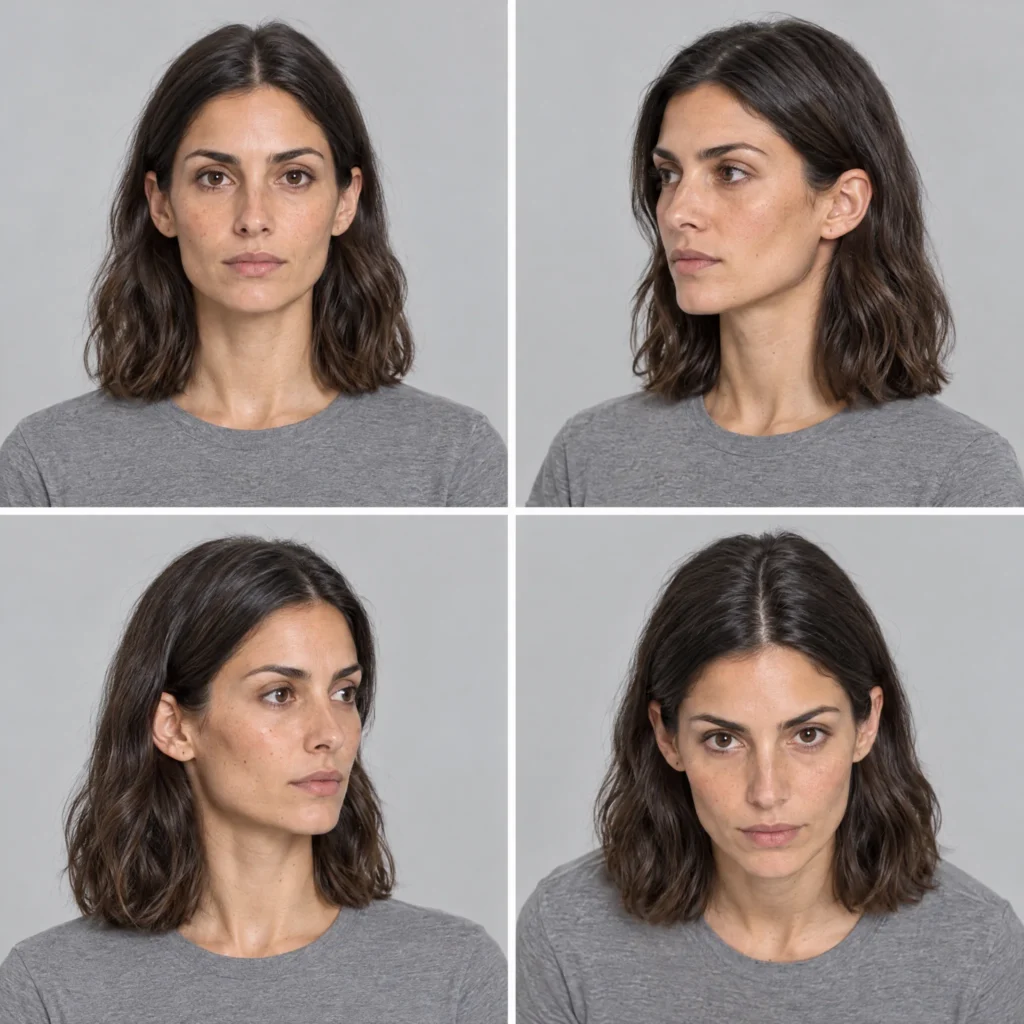
Check each sheet against the turnaround before you keep it. If one frame in a grid has drifted, regenerate the sheet rather than keeping a bad frame. Everything you train on becomes part of the identity.
Step 4: Cut the Sheets Into a Training Set
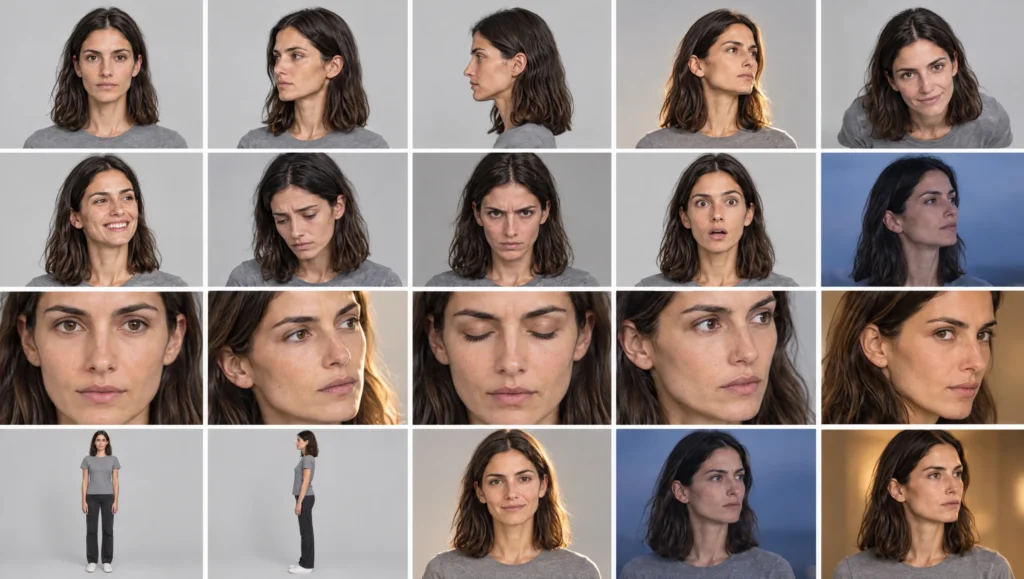
Soul ID wants individual photos, not grids. Open each approved sheet in any image editor and crop every frame into its own file.
The turnaround gives you five full-length images. The expression sheet adds six, the four-lights sheet adds four, and the close-up sheet adds four more. That is nineteen. Generate a second close-up sheet with the angles reversed, or a second expression sheet with four new expressions, and you are comfortably past twenty. Keep at least one full-length image in the set, because Higgsfield asks for it.
Name the files so you can find them again, for example mara_id_01_front.png through to mara_id_24_closeup.png, and put them in one folder. This folder is your character’s identity, and you will reuse it if you ever need to retrain.
Two rules while cropping. Crop generously around the head so the face is never cut, because cropped faces are on Higgsfield’s list of things to avoid. And do not add anything to the set that you would not want in every future scene: no scene frames, no costumes, no locations, no props.
Step 5: Train the Soul ID
In Higgsfield, go to Soul and choose Train new character. Upload your folder of cropped images. Training takes a few minutes. When it finishes, name the character with its name and a version number, for example Mara_v1. Then you always know which sheet it was built from.
From this point, select the character in the Character tab whenever you generate, and remove the face and hair description from your prompts. The identity now lives in the trained model. Describing the face again in words gives the model a second opinion to argue with, and that is where drift creeps back in.
Step 6: Test It Before You Trust It
Before you build a project on the new Soul ID, run three test scenes that stress it in different ways. Use a wide shot where the face is small, a close-up in strong coloured light, and a shot with the character in profile. Compare each one with the turnaround.
Prompt 6: Soul ID Stress Test (Character tab: your Soul ID)
Medium shot, 50mm lens, eye level. [CHARACTER NAME] turns to look over the left shoulder towards the camera. Plain dark clothing. Location: a quiet street at night. Lighting: cool blue ambient light with one warm shop window behind. Photographic realism. The face and hair match the trained character exactly.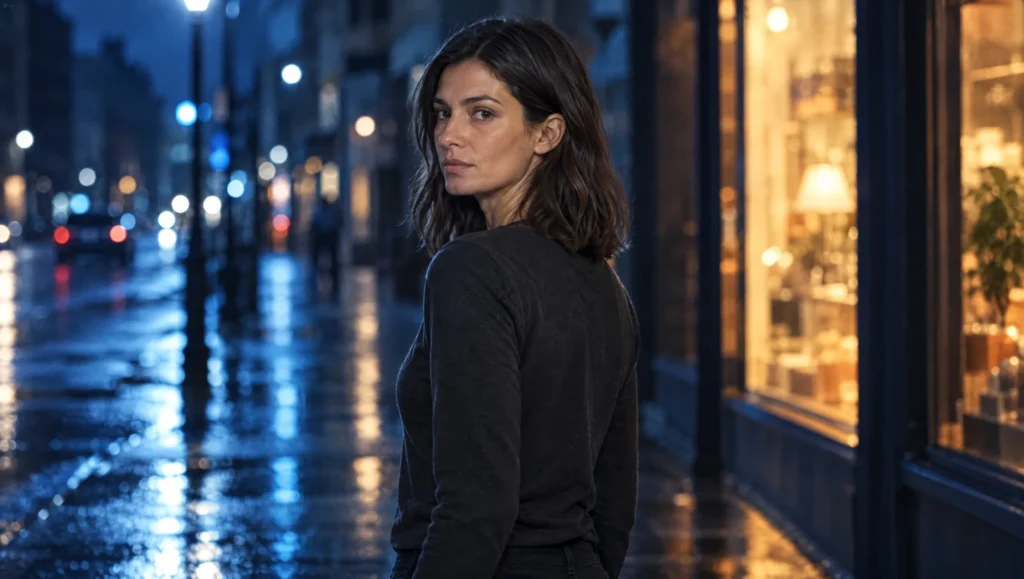
If the face holds in all three, the identity is ready. If it holds in two and not the third, the usual cause is a thin spot in the training set. Usually that means not enough profile views, or not enough frames in cool light. Generate one more sheet that covers the gap, crop it, and train Mara_v2.
Keeping Two Characters Apart
A Soul ID holds one person. For a scene with two consistent characters, train each one separately and combine them with Higgsfield’s Elements feature. Elements lets you bring more than one reference into a single generation. Design the two characters to be instantly different in silhouette, hair and main colour before you train. Two trained identities that look alike will blur together in a wide shot, however good the training is. The full method is in my guide to keeping two AI characters consistent in one scene.
From Identity to Scenes
Once the Soul ID is trained, the next layer is the wardrobe. Soul ID holds the face and body; it does not hold clothing. For that, the character needs a fixed outfit description and a wardrobe reference sheet, which is the method in my guide to keeping an AI character’s wardrobe consistent across scenes. Together, a trained Soul ID and a locked wardrobe give you a character who is the same person wearing the same clothes in scene one and scene twenty.
For sequences inside one continuous moment, Higgsfield’s Popcorn generates up to eight frames in a single pass. The character and location references are held across all of them. Save the strongest frame and feed it back as the reference for the next generation. That way the whole production carries forward from an approved image rather than drifting from shot to shot.
Common mistake
Training on scene frames. It is tempting to throw your best cinematic shots into the training set because they look wonderful. Every one of them carries a costume, a location and a light colour, and the model learns those alongside the face. Weeks later the character turns up in a new scene with a ghost of the old coat. Train only on the clean identity sheets, in the grey T-shirt, on the grey background.
Quick version
Write a precise physical description. Generate a five-view turnaround in a grey T-shirt and approve it. Generate an expression sheet, a four-lights sheet and a close-up sheet from the turnaround. Crop every frame into its own file until you have at least twenty, including one full-length. Train the Soul ID, name it with a version number, and stop describing the face in prompts. Test it in three hard scenes before you use it.
Your move
Take one character from your current project and run Prompt 1 now. Then generate the turnaround with Prompt 2 and do not accept it until you would know the face anywhere.
Get the prompts. All six prompts from this guide are in the free Prompt Library under Character, with the full identity, wardrobe and continuity set alongside them.
Related articles
- how to keep an AI character’s wardrobe consistent across scenes
- how to create a consistent AI character from scratch
- how to fix faces that change between AI shots
Paid next step: The AI Character Continuity System, the complete method with 72 prompts, the full character sheet, a correction library and a worked example.
Frequently Asked Questions
Can I train Soul ID on AI-generated images?
Yes. Soul ID learns from the photos you give it, and generated identity sheets work when they are clean, consistent and cropped into individual images. The quality of the training set decides the quality of the identity.
How many images do I need?
Higgsfield asks for twenty or more and supports up to eighty. Twenty to thirty clean images from a turnaround, an expression sheet, a lighting sheet and a close-up sheet is a strong set.
Why does my character’s face still change a little?
Soul ID aims for clearly the same person rather than an exact copy. Small variation is normal. Larger drift usually means scene frames got into the training set, or the prompt is describing the face again on top of the trained identity.
Can one Soul ID hold two characters?
No. Train one Soul ID per character and combine them with Elements for scenes where both appear.



Read the Comments +