HIGGSFIELD · TOOL GUIDE
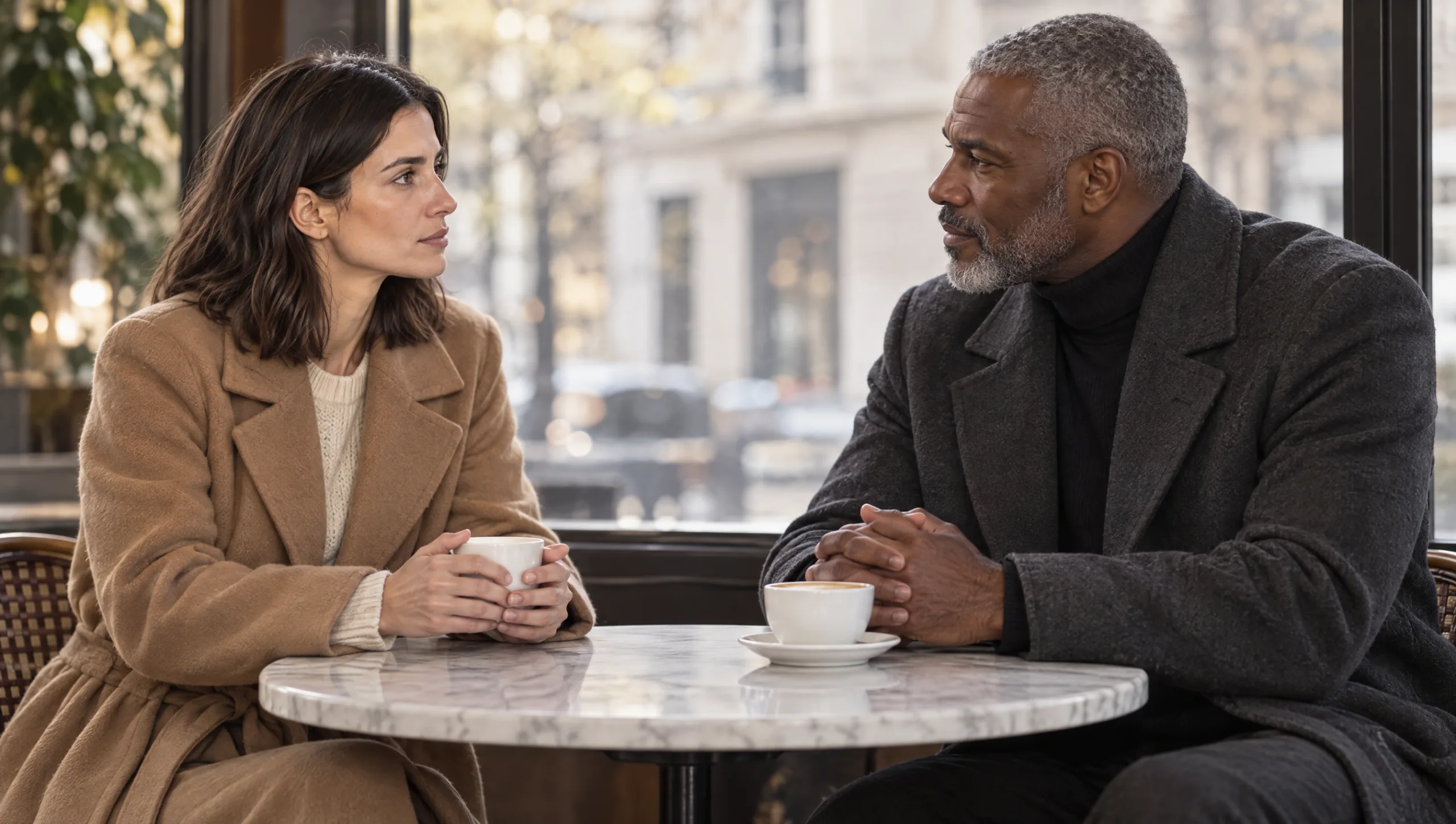
One consistent character is hard enough. The first time you put two AI characters in one scene, something new goes wrong. She gets his jaw, he gets her hair, or the model quietly decides they are the same person in different clothes. A Soul ID holds one person, and two people in one generation borrow from each other unless you stop them. This guide is the method for two AI characters in one scene. Build the second character the same way as the first and design the two to be opposites. Combine them through Higgsfield’s Elements, write the prompt so each one is anchored separately, and audit every frame for blend.
At a glance
- Build the second character with its own description, turnaround, identity set and Soul ID.
- Design the two to be opposites in silhouette, hair, skin tone and main colour.
- Combine them with Elements, one Soul ID per character.
- Write the prompt with each character in its own sentence, in a fixed order.
- Shoot the two-shot wide first, approve it, then cut to singles that carry it forward.
- Audit each frame for blend before you keep it.
You will need: two trained Soul IDs (or two approved turnarounds), an outfit lock and sheet for each, and the scene written in a sentence.
Why Two Characters Blend
An image model builds a frame from everything it is shown and told. With two people in the prompt, it has two faces to hold. Nothing tells it which feature belongs to whom. If the two look even slightly alike, it averages them. If the prompt describes them in one long sentence, it loses track of which adjective belongs to which person. Blend is the result: features that migrate from one character to the other, or two characters that drift towards a single face.
The fix has three parts. Make them impossible to confuse. Hold each one in its own reference. Write the prompt so the model deals with one person at a time.
Step 1: Build the Second Character Properly
There is no shortcut here. The second character gets the full method the first one had. That means a description under 120 words, a five-view turnaround in a grey T-shirt, and an expression sheet, a four-lights sheet and a close-up sheet. These are cropped into twenty or more images and trained as its own Soul ID with a version number. The method is in my guide to building an AI character sheet in Higgsfield.
Do not train the two characters together, and do not put a frame with both of them into either training set. A Soul ID holds one person, and a training image with two faces teaches it the wrong one.
Step 2: Design Them as Opposites
Before you generate the second turnaround, read the first character’s description. Make the second one different in every dimension the model can see at a distance. Silhouette: one tall and narrow, one shorter and broader. Hair: different length, different colour, different texture. Skin tone: visibly different. Main wardrobe colour: on opposite sides of the colour wheel. Age: at least a decade apart if the story allows.
Prompt 1: Opposite Character Builder (run in Claude or ChatGPT)
Here is the physical description of my first character. Write a physical description of a second character for the same film, in the same format and under 120 words, who is visibly different from the first in every way an image model could confuse: height and build, hair length, colour and texture, skin tone, face shape, apparent age, and posture. Keep the second character realistic and castable. No clothing, no setting, no mood.

First character: [PASTE DESCRIPTION]
Second character brief: [ROLE IN THE STORY, ONE LINE]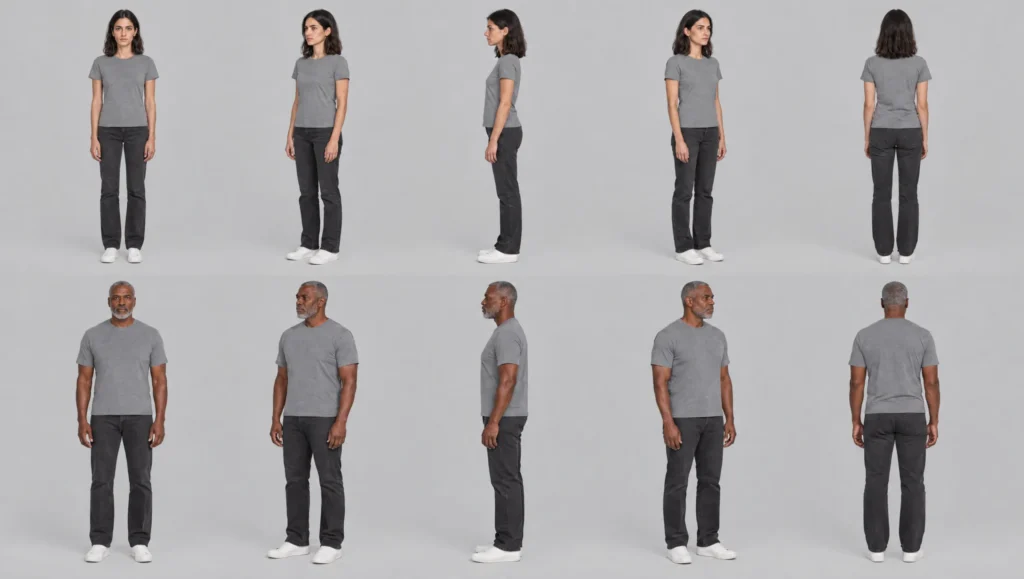
This is also a storytelling rule. Two characters who read differently in a wide shot are two characters the audience never confuses.
Step 3: Give Each One a Wardrobe Lock That Contrasts
Each character gets its own outfit lock and reference sheet. Write and generate them separately, with the right Soul ID selected each time. Choose the main colours together so that the two outfits contrast in a wide shot: camel against charcoal, bottle green against oatmeal. One carry-over item each, and never the same item on both.
Step 4: Combine Them With Elements
Higgsfield’s Elements feature lets you bring more than one reference into a single generation. For a two-character scene, that means both Soul IDs, each as its own element. The two outfit sheets go in as image references. The identity of each character comes from its own trained model, and the prompt tells the model which one is which.
The order you add the elements is the order you name the characters in the prompt. Keep it the same in every shot of the scene.
Step 5: Write the Prompt One Character at a Time
The two-character prompt follows the scene formula with one change. The character part becomes two sentences, one per character, in the fixed order. Each has its own wardrobe lock and its own anchor. The model deals with one person, then the other.
Prompt 2: Two-Character Scene (Elements: Soul ID A and Soul ID B · image references: outfit sheet A and outfit sheet B)
[SHOT SIZE], [LENS], [CAMERA HEIGHT AND ANGLE]. Two people. On the left, [CHARACTER A NAME] [ACTION A IN ONE SENTENCE], wearing [OUTFIT LOCK A]. On the right, [CHARACTER B NAME] [ACTION B IN ONE SENTENCE], wearing [OUTFIT LOCK B]. Location: [ONE LINE]. Lighting: [ONE LINE]. Photographic realism, shallow depth of field, subtle film grain. [CHARACTER A NAME]'s face, hair and apparent age match the first trained character exactly. [CHARACTER B NAME]'s face, hair and apparent age match the second trained character exactly. The two people share no facial features.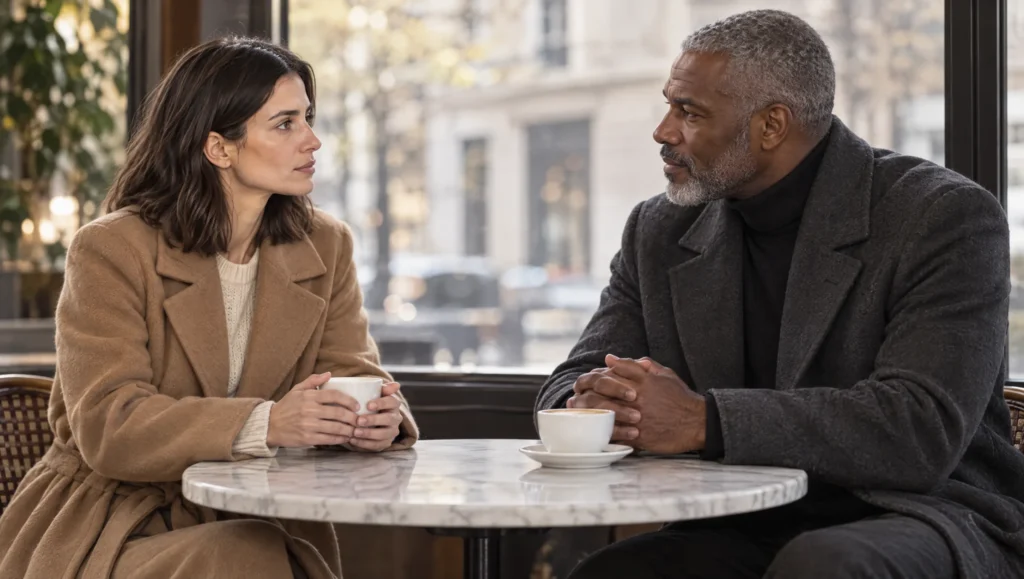
Three details matter. “Two people” early in the prompt sets the count before the model starts. “On the left” and “on the right” give each character a place so the model does not swap them. And the final line, that they share no facial features, is the anti-blend instruction, and it stays in every two-character prompt.
Step 6: Shoot the Two-Shot First, Then the Singles
Generate the wide two-shot first and audit it. Once it is approved, every single and over-the-shoulder in the scene is generated with the approved two-shot attached as a reference, alongside the elements. The singles then inherit the positions, the light and the eyelines from a frame where both characters were already right.
For a single on character A, the prompt still begins with “Two people” if any part of character B is in frame, such as a shoulder in an over-the-shoulder shot. For a true single with nobody else in frame, drop to the one-character formula with only Soul ID A selected. Attach the approved two-shot for continuity of light and position.
Prompt 3: Over-the-Shoulder Single (Elements: Soul ID A and Soul ID B · image references: the approved two-shot, outfit sheet A)
Medium close-up, 50mm lens, eye level, from behind [CHARACTER B NAME]'s right shoulder. Two people. In focus, [CHARACTER A NAME] [ACTION IN ONE SENTENCE], wearing [OUTFIT LOCK A]. Out of focus in the foreground, the shoulder and hair of [CHARACTER B NAME], wearing [OUTFIT LOCK B]. Same location, lighting and positions as the reference frame. Photographic realism. [CHARACTER A NAME]'s face matches the first trained character exactly. The two people share no facial features.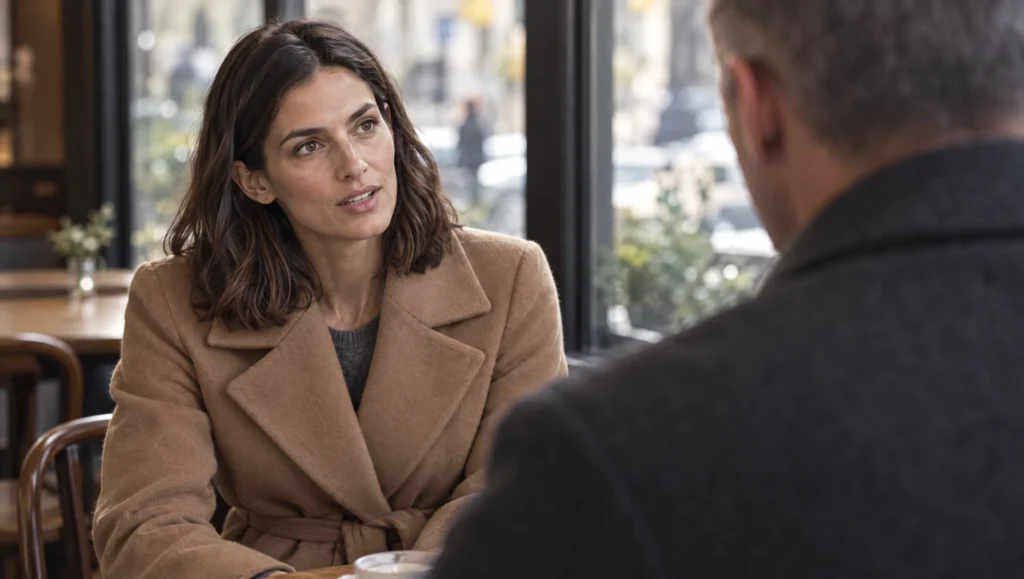
Step 7: Audit for Blend
Blend is subtle. The frame looks fine until you put each face next to its own turnaround. Do that for every two-character frame before you keep it.
Prompt 4: Blend Audit (attach turnaround A as image one, turnaround B as image two, the new frame as image three)
Image three shows two people. For the person on the left, compare their face with image one feature by feature and list any difference in one line each. For the person on the right, do the same against image two. Then answer: has either person borrowed a feature from the other (eyes, nose, lips, jaw, hair colour, hair texture, skin tone)? Have the two people been swapped left to right? Rate each identity match from 1 to 10.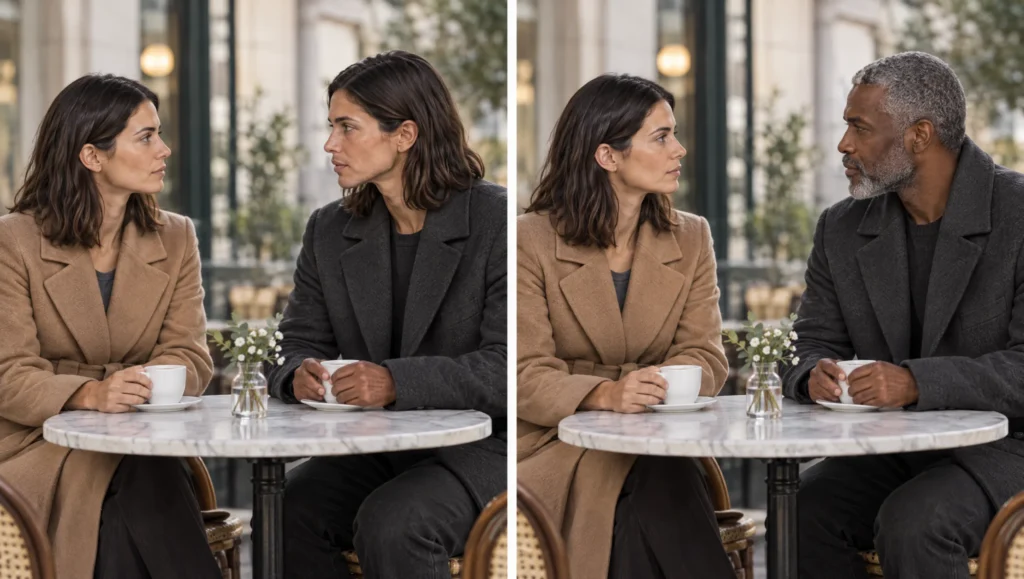
If one character has drifted and the other is right, correct only that character with the face correction method. Name the side: “Change only the face of the person on the left.” If both have drifted towards each other, the characters are too alike. Go back to Step 2 and push the second character further from the first.
When Two Is Too Many
Some scenes are better as two singles cut together than as one two-shot. This is true in traditional filmmaking as well. If the two-shot will not hold after three attempts, shoot the scene as alternating singles with matching eyelines. Character A looks frame right, character B looks frame left, with the same location line and the same lighting line. The audience assembles the scene in the edit, and each single is a one-character generation that the method already handles.
Common mistake
Two characters who look alike. It feels natural to cast two people of similar age, build and colouring, because that is what many stories call for. The model cannot keep them apart, and neither can an audience in a wide shot. Push them apart in every visible dimension before you generate anything. A story that truly needs two similar characters is a story to shoot as singles.
Quick version
Build the second character with the full method and its own Soul ID. Design the two as opposites in silhouette, hair, skin tone and main colour. Combine with Elements, one Soul ID each, in a fixed order. Write the prompt as “Two people”, then one sentence per character with its own lock and anchor, ending with “the two people share no facial features”. Shoot the two-shot first, then singles from it. Audit every frame for blend.
Your move
Put your two characters’ descriptions side by side and count the dimensions in which they could be confused: height, hair, skin tone, age, main colour. If the answer is more than one, run Prompt 1 before you generate a single frame.
Get the prompts. All four prompts from this guide are in the free Prompt Library under Character, with the single-character identity and continuity sets alongside them.
Related articles
- how to give each AI character its own voice in ElevenLabs
- how to build an AI character sheet in Higgsfield
- how to fix faces that change between AI shots
- how to write AI scene prompts with the scene formula
- how to create a consistent AI character from scratch
Paid next step: The AI Character Continuity System, the complete method with 72 prompts, including the two-character set, the blend audit and the scene log.
Frequently Asked Questions
Can one Soul ID hold two characters?
No. A Soul ID is one person. Train one per character and combine them with Elements for scenes where both appear.
Why do my two AI characters look like the same person?
They were designed too alike, or the prompt described them in one sentence, or one training set contained a frame with both faces. Make them opposites, prompt them one at a time, and keep the training sets clean.
How many characters can I put in one scene?
Two is reliable with this method. Three is possible with the same rules and a lot more auditing. Beyond that, shoot singles and assemble the scene in the edit.
Do I need Elements for two characters?
In Higgsfield, yes, because a single Soul ID selection holds one person. In other tools, attach both turnarounds and both outfit sheets and use the same prompt structure.


Read the Comments +